Thursday, October 22, 2020

Connect to Azure Analysis Services using ADOMD client in .NET Application

Azure Analysis Services is a fully managed platform as a service (PaaS) that provides enterprise-grade data models in the cloud. Interacting with Azure Analysis Services directly using SDKs and APIs from your custom applications means you can expose your data directly to your audience, wherever they are. This posts will walk you through how to open a connection from C# code.

Create Azure Analysis Service resource

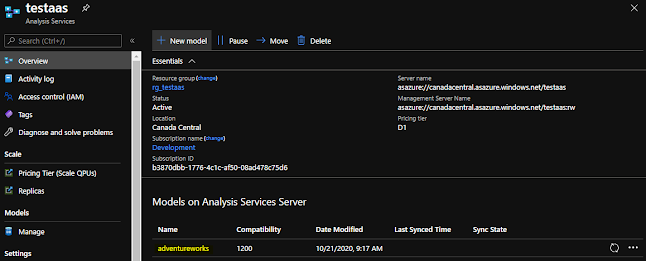
Follow this quick starter to create the server. You can also create a model with sample data (adventure works) right from within your Analysis Server. Click 'Manage' in the blade and click 'New Model'. Select 'Sample data' from the drop down and press 'Add'. It should add the model for you.

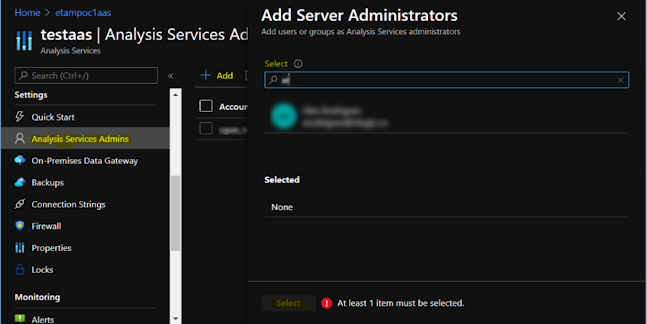
Also assign your account as Service Admin in order to connect from SSMS.

And copy the connection string directly from Azure Portal so we will use it later:

Register an application with the Microsoft identity platform

Azure Analysis Services uses Azure Active Directory (Azure AD) for identity management and user authentication. Service principals are used to perform automate common tasks, in our case, a c# application to query data from Azure Analysis Services. Follow this guide to register an application with Azure AD. 

When registration completes, the Azure portal displays the app registration's Overview pane, which includes its client ID and tenant ID.

Create a new application secret

You can add both certificates and client secrets (a string) as credentials to your confidential client app registration. Follow this guide to add a client secret to your registered application. After saving the client secret, the value of the client secret is displayed. Copy this value because you won't be able to retrieve the key later.

Grant permissions to app principal on the model

First, connect to Analysis Service using SSMS V17.1 and higher.

Then, select the database model and right click on Roles and add a new Role with read permission.

Now you can add the service principal you created in "Membership" tab.

Enter your principal in the "Manual Entry" box in the following format:

Acquire service principal token

This article show you how to connecting to Azure Analysis Services using service principal. The code below is to acquire a service principal token.

        private async Task<string> GetTokenAsync()

        {

            var authContext = new Microsoft.IdentityModel.Clients.ActiveDirectory.AuthenticationContext("https://login.windows.net/" + tenantId);

            var credential = new ClientCredential(clientId, clientSecret);

            var token = await authContext.AcquireTokenAsync($"https://{aasRegion}.asazure.windows.net", credential);

            return token.AccessToken; //Use this token to connect to AAS.

        }

Connecting to Azure Analysis Service using service principal token

Microsoft announced the .NET Core support for Azure Analysis Services client libraries in preview (AMO and ADOMD.NET). These packages are still in preview though, below I will use .Net as example.

Once we have the token, we can pass the token in password field in the connection string and leave user id empty.

        private string GetConnectionString(string token)

        {

            return $"Provider=MSOLAP;Data Source=asazure://{aasRegion}.asazure.windows.net/{aasServerName}:rw;Initial Catalog={aasDatabaseName};User ID=;Password={token};Persist Security Info=True;Impersonation Level=Impersonate";

        }

Where region is the Azure region in which the Azure Analysis Services instances has been deployed, and servername is the name you used to create the instance. Initial Catalog is be the name of your model. 

The full source code can be downloaded from my Github repository.


Tuesday, November 10, 2015

Generate Sprites with Sprity

CSS Sprites combins multiple images into a single image file for use on a website, to help with performance.

If you're using Grunt, Gulp, or Node in general, Sprity is a wonderful node package that creates sprites from a glob of images. Sprity has a lot of great features including formatting output as PNG, JPG (or Data URIs of those), and stylesheet generation in CSS, LESS, Sass, and Stylus.

node.js
Install node.js first if your system don't have one.

sprity
To compile sprites via command line, install sprity globally with:
> npm install sprity -g

sprity command line
Then install command line interface for sprity
> npm install sprity-cli -g

creat command
Usage:
sprity create <out> <src>... [options]

sprity create . C:\Projects\images\*.* -s C:\Projects\css\sprite.css
This will combine all images under C:\Projects\images, and create image sprite to current folder and also write css to sprite.css.

Options

out     path of directory to write sprite file to
src     glob strings to find source images to put into the sprite

Options:
    -b, --base64           create css with base64 encoded sprite (css file will be written to )
    -c, --css-image-path   http path to images on the web server (relative to css path or absolute path)  [../images]
    -f, --format           output format of the sprite (png or jpg)  [png]
    -n, --name             name of sprite file without file extension   [sprite]
    -p, --processor        output format of the css. one of css, less, sass, scss or stylus  [css]
    -t, --template         output template file, overrides processor option
    -r, --retina           generate both retina and standard sprites. src images have to be in retina resolution
    -s, --style            file to write css to, if omitted no css is written
    -w, --watch            continuously create sprite
    --background           background color of the sprite in hex  [#FFFFFF]
    --cachebuster          appends a "cache buster" to the background image in the form "?<...>" (random)  [false]
    --margin               margin in px between tiles  [4]
    --interpolation        Interpolation algorithm used when scaling retina images (nearest-neighbor|moving-average|linear|grid|cubic|lanczos)
    --opacity              background opacity of the sprite. defaults to 0 when png or 100 when jpg  [0]
    --orientation          orientation of the sprite image (vertical|horizontal|binary-tree)  [vertical]
    --prefix               prefix for the class name used in css (without .)
    --no-sort              disable sorting of layout


Note
sprity use file name as css class name, so better change all image files to lowercase. Below is a script to do this:
 for /f "tokens=*" %%a in ('dir C:\Projects\images /b/s/l') do (
    set f=%%a
    set f=!f:%%~dpa=!
    ren "%%a" "!f!"
)


If you are looking for online tool, try this url:
http://zerosprites.com/

Tuesday, June 03, 2014

Using JSON Web Tokens authentication in Angular Web API request


Introduction


There are basically two different ways of implementing server side authentication for apps with a frontend and an API:
  • The most adopted one, is Cookie-Based Authentication (you can find an example here) that uses server side cookies to authenticate the user on every request.
  • A newer approach, Token-Based Authentication, relies on a signed token that is sent to the server on each request.
In this post we will implement API authentication based on standard JSON Web Token (JWT).


ASP.Net Web API


There is an open project JwtAuthForWebAPI implement a DelegatingHandler that creates a new ClaimsPrincipal based on the incoming token and assigns it to the current thread.

1. You can install the NuGet package for this library at https://www.nuget.org/packages/JwtAuthForWebAPI/.

2. Register the handler in your WebApiConfig.Register() method:


var tokenBuilder = new SecurityTokenBuilder();
var configReader = new ConfigurationReader();

var jwtHandlerSharedKey = new JwtAuthenticationMessageHandler
{
    AllowedAudience = configReader.AllowedAudience,
    Issuer = configReader.Issuer,
    SigningToken = tokenBuilder.CreateFromKey(configReader.SymmetricKey),
    PrincipalTransformer = new SimplePrincipalTransformer()
};

config.MessageHandlers.Add(jwtHandlerSharedKey);

3. Secure your controllers and/or their actions with the [Authorize] attribute - per standard ASP.NET authorization practices.

[Authorize]
public string Get(string id)
{
...
}

4. Assign a token when user login with correct password.

var configReader = new ConfigurationReader();

var key = Convert.FromBase64String(configReader.SymmetricKey);
var credentials = new SigningCredentials(
    new InMemorySymmetricSecurityKey(key),
    "http://www.w3.org/2001/04/xmldsig-more#hmac-sha256",
    "http://www.w3.org/2001/04/xmlenc#sha256");

var tokenDescriptor = new SecurityTokenDescriptor
{
    Subject = new ClaimsIdentity(new[]
    {
        new Claim(ClaimTypes.Name, "bsmith"), 
        new Claim(ClaimTypes.GivenName, "Bob"),
        new Claim(ClaimTypes.Surname, "Smith"),
        new Claim(ClaimTypes.Role, "Customer Service")
    }),
    TokenIssuerName = "corp",
    AppliesToAddress = configReader.AllowedAudience,
    SigningCredentials = credentials
};

var tokenHandler = new JwtSecurityTokenHandler();
var token = tokenHandler.CreateToken(tokenDescriptor);
var tokenString = tokenHandler.WriteToken(token);

return tokenString;

Angular Client Side


1. The first step on the client side using AngularJS is to retrieve the JWT Token and have the JWT saved on sessionStorage.

myApp.controller('UserCtrl', function ($scope, $http, $window) {
  $scope.user = {username: 'john.doe', password: 'foobar'};
  $scope.message = '';
  $scope.submit = function () {
    $http
      .post('/authenticate', $scope.user)
      .success(function (data, status, headers, config) {
        $window.sessionStorage.token = data.token;
        $scope.message = 'Welcome';
      })
      .error(function (data, status, headers, config) {
        // Erase the token if the user fails to log in
        delete $window.sessionStorage.token;

        // Handle login errors here
        $scope.message = 'Error: Invalid user or password';
      });
  };
});


2. Add Authorization header for every outgoing request:


myApp.factory('authInterceptor', function ($rootScope, $q, $window) {
  return {
    request: function (config) {
      config.headers = config.headers || {};
      if ($window.sessionStorage.token) {
        config.headers.Authorization = 'Bearer ' + $window.sessionStorage.token;
      }
      return config;
    },
    response: function (response) {
      if (response.status === 401) {
        // handle the case where the user is not authenticated
      }
      return response || $q.when(response);
    }
  };
});

myApp.config(function ($httpProvider) {
  $httpProvider.interceptors.push('authInterceptor');
});

Reference:
1.  Cookies vs Tokens. Getting auth right with Angular.JS
2. Techniques for authentication in AngularJS applications
3. JwtAuthForWebAPI

Friday, May 16, 2014

AngularJS

1. AngularJS
AngularJS is an open-source web application framework, maintained by Google and community, that assists with creating single-page applications, one-page web applications that only require HTML, CSS, and JavaScript on the client side.

A very good introduction video by Dan Wahlin:
AngularJS Fundamentals in 60 Minutes - Modules, Routes and Factories

The AngularJS Magazine

Miško Hevery discusses the advantages and disadvantages of various design choices when structuring an app in AngularJS, and some of the best practices in the development.
AngularJS MTV Meetup: Best Practices (2012/12/11) 

2. Yeoman
Miško Hevery suggest Yeoman generator for AngularJS. It will make Angular development much easy with Yeoman & generator-angular.

Several open source tools need:
a. Install Node.js
b. Install Ruby, also make sure that path to Ruby bin folder is added to %PATH%
c. Install Git
d. Install compass, bower, and generator-angular

npm install -g bower
npm install -g generator-angular
 
restarted cmd window and ran "bower install" in the app folder After that


e. Once we have Node, we’ll install generator-angular which will also automatically install Yeoman, Grunt, and Bower.
 
Now create a project folder, and change current folder to project folder
mkdir myApp cd myApp
bower install
npm install generator-angular    # Local install to myApp
yo angular:app myApp 
 
More generators
 
f. Grunt work


grunt server

3. Bootstrap
Code a Responsive Website with Bootstrap 3 - [Lecture 1]

Thursday, March 20, 2014

Bridge Mode Workaround for Rogers Router CGN2-ROG

  1. Log into your CGN2-ROG, normally located at 192.168.0.1
  2. Credentials are cusadmin/password by default, because it’s a magical star child who wants to be different.
  3. If you can’t log in, factory reset it, or use the usb unlocker they may or may not have been included with the device.
  4. Go to 192.168.0.1/user/setup-capability.asp
  5. Disable everything, hit apply. This will place the router into bridge mode. You will NOT be able to access the router now. If you need to, I’d recommend factory reset. It’s possible to directly connect a machine to the router, and access the router through it’s external IP, but just…don’t do that.
  6. Set up your second router, plug the ethernet cable into the LAN port 1 of the CGN2-ROG, and into the WAN port of the new router. Turn it on.
  7. You should be good to go, and can treat your new router as the main router. For all intents and purposes, the CGN2-ROG is now just a fancy internet box.

Monday, February 10, 2014

Custom JQuery Validation Method and Message

Validate forms like you've never validated before! See full documentation here.

List of built-in Validation methods


A set of standard validation methods is provided:

    required – Makes the element required.
    remote – Requests a resource to check the element for validity.
    minlength – Makes the element require a given minimum length.
    maxlength – Makes the element require a given maxmimum length.
    rangelength – Makes the element require a given value range.
    min – Makes the element require a given minimum.
    max – Makes the element require a given maximum.
    range – Makes the element require a given value range.
    email – Makes the element require a valid email
    url – Makes the element require a valid url
    date – Makes the element require a date.
    dateISO – Makes the element require an ISO date.
    number – Makes the element require a decimal number.
    digits – Makes the element require digits only.
    creditcard – Makes the element require a credit card number.
    equalTo – Requires the element to be the same as another one

For example:

<input id="yourEmail" name="yourEmail" class="required email" />
<input id="confirmEmail" name="confirmEmail" equalTo="#yourEmail" />

Now let's implement our custom validation method "naPostal" to validate Canada/US postal code:

<script type="text/javascript">

        jQuery.validator.addMethod("naPostal", function (postal, element) {
            if (this.optional(element)) return true;
            var ctyField = $(element).attr("countryField");
            if (ctyField && $(ctyField).val() == "CA") return postal.match(/[a-zA-Z][0-9][a-zA-Z](-| |)[0-9][a-zA-Z][0-9]/);
            if (ctyField && $(ctyField).val() == "US") return postal.match(/^\d{5}(?:[\s-]\d{4})?$/);
            return postal.match(/^\d{5}-\d{4}$|^\d{5}$|^[a-zA-Z][0-9][a-zA-Z](| )?[0-9][a-zA-Z][0-9]$/gm);
        }, "Invalid postalcode");

        jQuery.extend(jQuery.validator.messages, {
            //Custom error message
            required: "Required field",
            email: "Please enter a valid email address."
        });

</script>

So we can use this method in our HTML code:

<input id="postalCode" name="postalCode" class="required naPostal" countryField="#countryCode" />
<select id="countryCode" name="countryCode">
    <option value="CA">Canada</option>
    <option value="US">USA</option>
</select>

Wednesday, November 20, 2013

Memcached in MVC projects

1. Install Memcached server in Windows

The latest Memcached version is 1.4.5, but the application doesn't support "-d install" parameter to install itself as Windows service.

So right now the 1.4.4 is still the option to go under Windows. Get a package from memcached 1.4.4 for Windows 32-bit from http://downloads.northscale.com/memcached-win32-1.4.4-14.zip.

Unzipped to a folder, then run the following command to install as win services
memcached.exe -d install

Start the server from the Microsoft Management Console or by running one of the following commands:
memcached.exe -d start

2. Check Memcached installation

You can telnet to the default port 11211 to check the status:
telnel localhost 11211

Then use the command stats to check status
stats
flush_all

3. Enyim Memcached client

EnyimMemcached is a .NET client library for memcached written in C#. You can get the source code from https://github.com/enyim/EnyimMemcached

Then it's simple to use the cache:

private static IMemcachedClient _cache = new MemcachedClient();

_cache.Store(StoreMode.Set, key, value);

object r = _cache.Get(key);
Of course you need some setting in the app/web.config:


You don't need log section if you are not doing the detail logging. Also the transcoder section is added here because I'm using the DataContractSerializer for my entities.

4. Some notes

On Azure, window only support the default protocol (Text).
 
The Enyim source code getting from Github is using log4net 1.2.10.0 targeting at .Net framework 3.5. If you are using log4net 1.2.12.0 (targeting at .Net framework 4.0) then there are some dll binding issue.

In order to re-compile the project to reference log4net 1.2.12.0 and targeting .Net framework 4.0, I end up disable the sign and removing the strong name sign public key file public_key.snk from the project, also remove the reference part in the CommonProperties.targets file under build folder.


Friday, October 18, 2013

Send HTML confirmation email with image part

CreateMail function:
        

        private MailMessage CreateMail(EmailArchive emailArchive, bool useCCAddress, bool isBodyHtml)
        {
            MailMessage mailMsg = new MailMessage();

            // From
            MailAddress mailAddress = new MailAddress(emailArchive.FromAddress, emailArchive.FromName);
            mailMsg.From = mailAddress;

            // Subject and Body
            mailMsg.Subject = emailArchive.Subject;

            //mailMsg.Body = emailArchive.Body;
            EmbedImages(mailMsg, emailArchive.Body);

            mailMsg.IsBodyHtml = isBodyHtml;

            // To

            if (useCCAddress)
            {
                if (string.IsNullOrEmpty(emailArchive.CCAddress))
                    mailMsg = null;
                else
                    mailMsg.To.Add(new MailAddress(emailArchive.CCAddress, emailArchive.CCName));

            }
            else
            {
                mailMsg.To.Add(new MailAddress(emailArchive.ToAddress, emailArchive.ToName));
            }

            return mailMsg;
        }

The following pattern will match all img tag in the html source code:
string pattern = "<img.+?src=\"(.+?)\".+?/?>";
EmbedImages function:

        /// 
        /// The function only deal with src like "/image/file.jpg"
        /// 
        /// 
        /// 
        public static void EmbedImages(MailMessage mailMessage, string body)
        {
            // Check config file
            string path = ConfigurationManager.AppSettings["WebSiteRootFolder"];
            AlternateView av;
            if (string.IsNullOrEmpty(path))
            {
                ShopLogging.Warn("Can not find [WebSiteRootFolder] setting in config file!!!");

                //path = "D:\\User\\up\\";
                av = AlternateView.CreateAlternateViewFromString(string.Format("{0}", body), null, MediaTypeNames.Text.Html);
                mailMessage.AlternateViews.Add(av);

                return;
            }


            if (path.Right(1) == "\\")
                path = path.Left(path.Length - 1);

            List links = new List();
            LinkedResource res;
            string file, id, ext, cid;
            int i = 1;

            // Find all image tag
            // 
            string pattern = "";

            body = Regex.Replace(body, pattern, delegate(Match tag)
            {
                string v = tag.Value;
                file = tag.Groups[1].Value;

                // The function only deal with src like "/image/file.jpg"
                // If the src is not absolute path to "/", skip
                if (file.Left(1) != "/")
                    return v;

                // Replace virtual path to physical path
                file = file.Replace('/', '\\');
                ext = Path.GetExtension(file);
                if (ext.Left(1) == ".")
                    ext = ext.Substring(1);

                // Generate mail path ID
                id = Path.GetFileName(file);
                id = i.ToString() + "_" + id.UrlClean().Replace('.', '_');

                // Add root folder
                if (file.Left(1) == "\\")
                    file = file.Substring(1);
                file = path + "\\" + file;
                cid = string.Format("cid:{0}", id);

                // Add Linked Recource
                res = new LinkedResource(file, string.Format("image/{0}", ext));
                res.ContentId = id;
                links.Add(res);

                //body = body.Replace(tag.Groups[1].Value, string.Format("cid:{0}", id));
                i++;
                v = v.Replace(tag.Groups[1].Value, cid);
                return v;
            });

            av = AlternateView.CreateAlternateViewFromString(string.Format("{0}", body), null, MediaTypeNames.Text.Html);
            links.ForEach(l => av.LinkedResources.Add(l));
            mailMessage.AlternateViews.Add(av);

        }

Monday, September 16, 2013

SessionState using SQL Server

1. Install database scheme

C:\Windows\Microsoft.NET\Framework\v4.0.30319>

aspnet_regsql.exe -sstype c -ssadd -d DatabaseName -U username -P password  -S xx.xx.xx.xxx


2. Config

    < sessionState mode="SQLServer" sqlConnectionString="data source=DatabaseName ;user id=username ;password=password" cookieless="UseCookies" timeout="20"/>

Remember to give the user dbowner permission.

3.  ASP.NET Universal Providers

 ASP.NET Universal Providers that will extend Session, Membership, Roles and Profile support to SQL Compact Edition and SQL Azure. Other than supporting additional storage options, the providers work like the existing SQL-based providers.

    < sessionState mode="Custom" customProvider="DefaultSessionProvider" allowCustomSqlDatabase="true">
      < providers>
        < add name="DefaultSessionProvider" type="System.Web.Providers.DefaultSessionStateProvider, System.Web.Providers, Version=1.0.0.0, Culture=neutral, PublicKeyToken=31bf3856ad364e35" connectionStringName="DefaultConnection" />
      < /providers>
    < /sessionState>

See here for detail about Azure config.

Thursday, April 28, 2011

WCF Notes

Instance Management

WCF supports three types of instance activation: per-call/Sessionful/singleton service.

[ServiceContract]
interface IMyContract
{...}

[ServiceBehavior(InstanceContextMode = InstanceContextMode.Single)]
[ServiceBehavior(InstanceContextMode = InstanceContextMode.PerSession)]
[ServiceBehavior(InstanceContextMode = InstanceContextMode.PerCall)]
class MyService : IMyContract
{...}


Operations


WCF supports three invocation model: Request-Reply/One-Way/Callback.


[ServiceContract]
interface IMyContract
{
[OperationContract(IsOneWay = true)]
void MyMethod( );
}


[ServiceContract(CallbackContract = typeof(ISomeCallbackContract))]
interface IMyContract
{
[OperationContract]
void DoSomething( );
}


Fault Contracts


The client can actually encounter three types of errors when trying to invoke the service: communication errors, errors related to the state of the proxy, service-thrown exceptions.


By default, any exception thrown by the service reaches the client as a FaultException.


Transactions


Transaction Flow: Allowed, NotAllowed, Mandatory.


Transaction Protocols


Transaction management protocols: Lightweight, OleTx(RPC), WS-Atomic Transaction (WSAT).


Transaction Managers


The three transaction managers are the Lightweight Transaction Manager (LTM), the Kernel Transaction Manager (KTM), and the Distributed Transaction Coordinator (DTC).

Tuesday, April 26, 2011

Data Contract Hierarchy in WCF

Data contract class may be the subclass of another data contract class.
Known Types
By default, you cannot use a subclass of a data contract class instead of its base class. The KnownType attribute allows you to designate acceptable subclasses for the data contract.
[DataContract]
[KnownType(typeof(Customer))]
class Contact
{...}

[DataContract]
class Customer : Contact
{...}


Service Known Types


Instead of using the KnownType attribute on the base data contract, when the ServiceKnownType attribute is applied on a specific operation on the service side, then only that operation (across all supporting services) can accept the known subclass.


When the ServiceKnownType attribute is applied at the contract level, all the operations on that contract can accept the known subclass across all implementing services


[ServiceContract]
[ServiceKnownType(typeof(Customer))]
interface IContactManager
{
   [OperationContract]
   void AddContact(Contact contact);

   [OperationContract]
   Contact[] GetContacts( );
}


Configuring Known Types


WCF also lets you configure the known types in the service's or client's config file.


Generics


You cannot define WCF contracts that rely on generic type parameters. Generics are specific to .NET, and using them would violate the service-oriented nature of WCF. However, you can use bounded generic types in your data contracts.

Wednesday, April 20, 2011

The ABC of WCF Service

A WCF service allows communication through an Endpoint.

ABC is an abbreviation of Address, Binding and Contract attributes of an Endpoint.

A - Where is the endpoint?
B- How to communicate with endpoint?
C - What functionalities do the endpoint provide?

The Binding is an attribute of an endpoint and it lets you configure transport protocol, encoding and security.

Types of Binding


basicHttpBinding
This type of binding exists in new .Net world only to support backward compatibility with ASMX based clients (WS-Basic Profile 1.1). Basic http binding sends SOAP 1.1 messages and is used when there is a requirement for the WCF services to communicate with non WCF based systems.

Note: All other bindings except basicHttpBinding support WS* specifications including security, reliable messaging and transaction support, where appropriate.

wsHttpBinding
This binding sends SOAP 1.2 messages and implements WS* specifications to support enterprise requirements of security, reliability, ordered delivery and transaction management.

netTcpBinding
This binding sends SOAP 1.2 messages, provides binary encoding and optimized communication between WCF services and WCF clients on Windows network. This binding is the fastest binding amongst all WCF binding options. Unlike http bindings, the TCP binding does not offer interoperability but is highly optimized for .Net 3.0 and above clients. Thus, in .Net version 3.0 and above, providing an endpoint with netTcpBinding is an easy option to development of distributed systems and can replace COM+ and .Net Remoting model.

…

Bingding Interoperability Security Session Transactions Duplex
BasicHttpBinding Basic Profile 1.1 (None), Transport, Message None, (None) None n/a
WSHttpBinding WS Transport, (Message), Mixed (None), Transport, Reliable Session (None), Yes n/a
WSDualHttpBinding WS (Message) (Reliable Session) (None), Yes Yes
WSFederationHttpBinding WS-Federation (Message) (None), Reliable Session (None), Yes No
NetTcpBinding .NET (Transport), Message Reliable Session, (Transport) (None), Yes Yes
NetNamedPipeBinding .NET (Transport) None, (Transport) (None), Yes Yes
NetMsmqBinding .NET Message, (Transport), Both (None) (None), Yes No
NetPeerTcpBinding Peer (Transport) (None) (None) Yes
MsmqIntegrationBinding MSMQ (Transport) (None) (None), Yes n/a

Monday, April 04, 2011

Use NPOI to export to Excel spreadsheet in MVC

NPOI is a little known .NET port of POI Java project to create an open source Microsoft Office 97-2003 file reader and writer (without using or having Microsoft Office installed). It’s really easy to create a new Excel sheet from scratch, or just reading from a existing template and populate new cells.

To use NPIO, first include the namespace,

using NPOI.HSSF.UserModel;
using NPOI.HPSF;
using NPOI.POIFS.FileSystem;


Then you can open a template or create a need sheet:


FileStream fs = new FileStream(templateFile, FileMode.Open, FileAccess.Read);
HSSFWorkbook workbook1 = new HSSFWorkbook(fs, true);
// Create new book
HSSFWorkbook workbook2 = new HSSFWorkbook();


To populate the cell content,


//HSSFSheet sheet1 = hssfworkbook.CreateSheet("Sheet1");
HSSFSheet sheet1 = hssfworkbook.GetSheet("Sheet1");
HSSFRow row = sheet1.CreateRow(rowIndex);
row.CreateCell(cellIndex).SetCellValue(value);


After all done, to export as a Excel file in MVC,


MemoryStream stream = new MemoryStream();
workbook.Write(stream);
return File(stream.ToArray(), "application/vnd.ms-excel", "filename.xls");


Also, Hunter Beanland has a great NPOI Reader/Writer Helper to make reading and writing of Excel files extremely easy.


Excel xr = new Excel;
xr.Open("");
while (xr.ReadRow())
{
while (xr.CanReadCell())
{
lblMessage.Text &= "," & xr.ReadCell().ToString();
}
lblMessage.Text &= "

";
}
xr.WriteNewRow();
xr.WriteCell("text");
xr.WriteCell(1234);
xr.WriteCell(DateTime.Now);
xr.WriteCellAsDate(Now, "dd/MM/yy");
xr.FormatLastCell(true, CellHorizontalAlignment.RIGHT, 15, 2, NPOI.HSSF.Util.HSSFColor.BLUE.index, NPOI.HSSF.Util.HSSFColor.OLIVE_GREEN.index, true);
xr.Save("c:\path\sample data_OUT.xls");


Maurits Kammer did a quick VB to C# port of this this helper, full c# source code below:


//Excel XLS BIFF File Reader/Writer - Shell for NPOI 1.2.2 alpha2
//Written by Hunter Beanland: www.beanland.net.au
//ver 1.1 2010-04-07 +TableToXLS, fix ReadCell exception if value is nothing
//ver 1.2 2010-05-04 Fixed IsNothing(xlRow) in ReadCell/CanReadCell
//MKA 2010-04-29> code ported from VB.NET to C# ... thank goodness ;)
//Note: This C# port may not have the very latest changes/fixes which the VB original has.

using System;
using System.Web;
using System.Data;
using System.Collections;
using System.IO;
using NPOI.HSSF.UserModel;
using NPOI.HPSF;
using NPOI.POIFS.FileSystem;
using System.Text.RegularExpressions;
using System.Drawing;

//Sample Code:
//Excel xr = new Excel;
//xr.Open("");
//while (xr.ReadRow())
//{
// while (xr.CanReadCell())
// {
// lblMessage.Text &= "," & xr.ReadCell().ToString();
// }
// lblMessage.Text &= "

";
//}
//xr.WriteNewRow();
//xr.WriteCell("text");
//xr.WriteCell(1234);
//xr.WriteCell(DateTime.Now);
//xr.WriteCellAsDate(Now, "dd/MM/yy");
//xr.FormatLastCell(true, CellHorizontalAlignment.RIGHT, 15, 2, NPOI.HSSF.Util.HSSFColor.BLUE.index, NPOI.HSSF.Util.HSSFColor.OLIVE_GREEN.index, true);
//xr.Save("c:\path\sample data_OUT.xls");


///


/// Provides easy to use API for basic Excel 97+ BifF file reading and writing. Exposes the NPOI Excel objects for advanced usage.
///

///
public class Excel
{
public string ErrorMessage;
///
/// return String.Empty or Nothing if error (such as no more rows/columns)
///

public bool returnEmptyOnError;
public HSSFWorkbook xlWorkbook;
public HSSFSheet xlSheet;
public HSSFRow xlRow;
public HSSFCell xlCell;
public int CurrentRow, CurrentColumn;

///
/// Open the XLS file for reading
///

/// Path to the file to open. Empty/not specified for new file
/// true if opened successfully
///
public bool Open(string XlsFilePath)
{
if (XlsFilePath == null)
{
XlsFilePath = "";
}

try
{
if (XlsFilePath == String.Empty)
{
xlWorkbook = new HSSFWorkbook();
xlSheet = xlWorkbook.CreateSheet();
}
else
{
FileStream fs = new FileStream(XlsFilePath, FileMode.Open);
using (fs)
{
xlWorkbook = new HSSFWorkbook(fs);
xlSheet = xlWorkbook.GetSheetAt(0);
fs.Close();
}
}
CurrentRow = -1;
CurrentColumn = -1;
return true;
}
catch (Exception ex)
{
ErrorMessage = ex.Message;
//HttpContext.Current.Trace.Warn(ex.ToString());
return false;
}

}


//MKA: provides default values for Optional params
public bool ReadRow()
{
return ReadRow(-1);
}

///
/// See if the next row has data. return false if end of sheet.
///

/// if provided, skip to the specified row. 0 based index (Excel iteself is 1 based index).
/// true if read ok
///
public bool ReadRow(int Row)
{
try
{
if (Row > -1)
{
CurrentRow = Row;
}
else
{
CurrentRow += 1;
}
xlRow = xlSheet.GetRow(CurrentRow);
if (xlRow == null)
{
return false;
}
else
{
return true;
}
}
catch (Exception ex)
{
ErrorMessage = ex.Message;
return false;
}
}

//MKA: provides default values for Optional params
public bool CanReadCell()
{
return CanReadCell(-1, -1);
}

///
/// Tests if we can read the next cell (it exists)
///

/// if provided, skip to the specified row. 0 based index (Excel iteself is 1 based index).
/// if provided, skip to the specified column. 0 based index (Excel iteself is 1 based index).
/// true if the cell exists
///
public bool CanReadCell(int Row, int Column)
{
if (Row > -1)
{
xlRow = xlSheet.GetRow(Row);
}
if (xlRow == null)
{
return false;
}
if (Column > -1)
{
if (Column > xlRow.PhysicalNumberOfCells - 1)
{
return false;
}
else
if (CurrentColumn + 1 > xlRow.PhysicalNumberOfCells - 1)
{
return false;
}
}

return true;
}

//MKA: provides default values for Optional params
public Object ReadCell()
{
return ReadCell(-1, -1);
}


///
/// Read the value at the next cell (or at the specified cell).
///

/// if provided, read from the specified row. 0 based index (Excel iteself is 1 based index).
/// if provided, skip to the specified column. 0 based index (Excel iteself is 1 based index).
/// Value or Nothing/Empty if read error
///
public Object ReadCell(int Row, int Column)
{
if (Row > -1)
{
CurrentRow = Row;
xlRow = xlSheet.GetRow(Row);
}
if (xlRow == null)
{
return (returnEmptyOnError ? String.Empty : null);
}
if (Column > -1)
{
CurrentColumn = Column;
}
else
{
CurrentColumn += 1;
}
if (CurrentColumn > xlRow.PhysicalNumberOfCells - 1)
{
return (returnEmptyOnError ? String.Empty : null);
}

if (xlRow.GetCell(CurrentColumn) == null)
{
return String.Empty;
}
else
{
switch (xlRow.GetCell(CurrentColumn).CellType)
{
case HSSFCellType.STRING:
{
return xlRow.GetCell(CurrentColumn).StringCellValue;
}
case HSSFCellType.NUMERIC:
{
return xlRow.GetCell(CurrentColumn).NumericCellValue;
}
case HSSFCellType.BOOLEAN:
{
return xlRow.GetCell(CurrentColumn).BooleanCellValue;
}
default:
{
return (returnEmptyOnError ? String.Empty : null);
}
}
}
}

//MKA: provides default values for Optional params
public int ReadCellAsInteger()
{
return ReadCellAsInteger(-1, -1);
}

///
/// Read the value at the next cell (or at the specified cell) int type. Strings are attempted to be converted to Integer
///

/// if provided, read from the specified row. 0 based index (Excel iteself is 1 based index).
/// if provided, skip to the specified column. 0 based index (Excel iteself is 1 based index).
/// Value or 0 if read error
///
public int ReadCellAsInteger(int Row, int Column)
{
Object myInteger = ReadCell(Row, Column);
if (myInteger.GetType() == typeof(Int32))
{
return (int)myInteger;
}
else if (myInteger.GetType() == typeof(String))
{
int xlInteger;
int.TryParse(myInteger.ToString(), out xlInteger);
return xlInteger;
}
else
{
return 0;
}
}

///
/// Read the value at the next cell (or at the specified cell) as Double type. Strings are attempted to be converted to Double
///

/// if provided, read from the specified row. 0 based index (Excel iteself is 1 based index).
/// if provided, skip to the specified column. 0 based index (Excel iteself is 1 based index).
/// Value or 0 if read error
///
public double ReadCellAsDouble(int Row, int Column)
{
if (Row == null)
{
Row = -1;
}
if (Column == null)
{
Column = -1;
}

Object dbl = ReadCell(Row, Column);
if (dbl.GetType() == typeof(Double))
{
return (double)dbl;
}
else if (dbl.GetType() == typeof(String))
{
double xlDouble;
Double.TryParse(dbl.ToString(), out xlDouble);
return xlDouble;
}
else
{
return 0.0;
}
}

//MKA: provides default values for Optional params
public DateTime ReadCellAsDate()
{
return ReadCellAsDate(-1, -1);
}

///
/// Read the value at the next cell (or at the specified cell) as DateTime type. Strings are attempted to be converted to DateTime
///

/// if provided, read from the specified row. 0 based index (Excel iteself is 1 based index).
/// if provided, skip to the specified column. 0 based index (Excel iteself is 1 based index).
/// Value or MinValue if read error
///
public DateTime ReadCellAsDate(int Row, int Column)
{
Object dbl = ReadCell(Row, Column);
if (dbl.GetType() == typeof(Double))
{
return xlRow.GetCell(CurrentColumn).DateCellValue;
}
else if (dbl.GetType() == typeof(String))
{
DateTime xlDate;
DateTime.TryParse(dbl.ToString(), out xlDate);
return xlDate;
}
else
{
return DateTime.MinValue;
}
}

//MKA: provides default values for Optional params
public bool WriteCell(Object Value)
{
return WriteCell(Value, -1, -1);
}

///
/// Write the value at the next cell (or at the specified cell).
///

/// if provided, read from the specified row. 0 based index (Excel iteself is 1 based index).
/// if provided, skip to the specified column. 0 based index (Excel iteself is 1 based index).
/// true if ok
///
public bool WriteCell(Object Value, int Row, int Column)
{
try
{
if (Row > -1)
{
CurrentRow = Row;
xlRow = xlSheet.GetRow(Row);
if (xlRow == null)
{
xlRow = xlSheet.CreateRow(Row);
CurrentColumn = -1;
}
}
else
{
if (xlRow == null)
{
if (CurrentRow == -1)
{
CurrentRow = 0;
}
xlRow = xlSheet.CreateRow(CurrentRow);
CurrentColumn = -1;
}
}
if (Column > -1)
{
CurrentColumn = Column;
}
else
{
CurrentColumn += 1;
}

if (CurrentColumn > xlRow.PhysicalNumberOfCells - 1)
{
xlCell = xlRow.CreateCell(CurrentColumn);
}
if (Value.GetType() == typeof(String))
{
xlCell.SetCellType(HSSFCellType.STRING);
}
else if (Value.GetType() == typeof(Int32) || Value.GetType() == typeof(Decimal) || Value.GetType() == typeof(Double))
{
xlCell.SetCellType(HSSFCellType.NUMERIC);
}
else if (Value.GetType() == typeof(DateTime))
{
HSSFDataFormat format;
format = xlWorkbook.CreateDataFormat();
HSSFCellStyle dateStyle;
dateStyle = xlWorkbook.CreateCellStyle();
dateStyle.DataFormat = format.GetFormat(System.Threading.Thread.CurrentThread.CurrentCulture.DateTimeFormat.ShortDatePattern + " HH:mm:ss");
xlCell.CellStyle = dateStyle;
}
else if (Value.GetType() == typeof(Boolean))
{
xlCell.SetCellType(HSSFCellType.BOOLEAN);
}
xlCell.SetCellValue(Value.ToString());
return true;
}
catch (Exception ex)
{
ErrorMessage = ex.Message;
return false;
}
}

//MKA: provides default values for Optional params
public bool WriteCellAsDate(DateTime Value, string DateTimeFormat)
{
return WriteCellAsDate(Value, DateTimeFormat, -1, -1);
}

///
/// Write the date/teime value at the next cell (or at the specified cell) with the specified format.
///

/// Date/Time value
/// Format to display the date/time in. ie: "dd/MM/yyyy HH:mm:ss AM/PM"
/// if provided, read from the specified row. 0 based index (Excel iteself is 1 based index).
/// if provided, skip to the specified column. 0 based index (Excel iteself is 1 based index).
/// true if ok
///
public bool WriteCellAsDate(DateTime Value, string DateTimeFormat, int Row, int Column)
{
try
{
if (Row > -1)
{
CurrentRow = Row;
xlRow = xlSheet.GetRow(Row);
if (xlRow == null)
{
xlRow = xlSheet.CreateRow(Row);
CurrentColumn = -1;
}
}
else
{
if (xlRow == null)
{
if (CurrentRow == -1)
{
CurrentRow = 0;
}
xlRow = xlSheet.CreateRow(CurrentRow);
CurrentColumn = -1;
}
}
if (Column > -1)
{
CurrentColumn = Column;
}
else
{
CurrentColumn += 1;
}
if (CurrentColumn > xlRow.PhysicalNumberOfCells - 1)
{
xlCell = xlRow.CreateCell(CurrentColumn);
}
if (String.IsNullOrEmpty(DateTimeFormat))
{
DateTimeFormat = System.Threading.Thread.CurrentThread.CurrentCulture.DateTimeFormat.ShortDatePattern + " HH:mm:ss";
}

HSSFDataFormat format;
format = xlWorkbook.CreateDataFormat();
HSSFCellStyle dateStyle;
dateStyle = xlWorkbook.CreateCellStyle();
dateStyle.DataFormat = format.GetFormat(DateTimeFormat);
xlCell.SetCellType(HSSFCellType.NUMERIC);
xlCell.CellStyle = dateStyle;
xlCell.SetCellValue(Value);
return true;
}
catch (Exception ex)
{
ErrorMessage = ex.Message;
return false;
}
}

///
/// Set the cell style of the last cell
///

/// Bold font. Default = false
/// Cell alignment. Default = HSSFCellStyle.ALIGN_GENERAL
/// Cell Width. Default = 10
/// Cell span. Default = 1
/// Font colour. Default = NPOI.HSSF.Util.HSSFColor.AUTOMATIC.index
/// Background colour. Default = NPOI.HSSF.Util.HSSFColor.AUTOMATIC.index
/// Thin black border. Default = false
/// true if ok
///
public bool FormatLastCell(bool Bold, CellHorizontalAlignment Align, int Width, int CellSpan, short FGColour, short BGColour, bool Border)
{
HSSFCellStyle xlStyle = xlCell.CellStyle;
if (xlStyle == null)
{
xlStyle = xlWorkbook.CreateCellStyle();
}
if (Bold || (FGColour != NPOI.HSSF.Util.HSSFColor.AUTOMATIC.index))
{
HSSFFont xlFont = xlWorkbook.CreateFont();
if (FGColour != NPOI.HSSF.Util.HSSFColor.AUTOMATIC.index)
{
xlFont.Color = FGColour;
}
if (Bold)
{
xlFont.Boldweight = HSSFFont.BOLDWEIGHT_BOLD;
}
xlStyle.SetFont(xlFont);
}
if (BGColour != NPOI.HSSF.Util.HSSFColor.AUTOMATIC.index)
{
if (BGColour != NPOI.HSSF.Util.HSSFColor.AUTOMATIC.index)
{
xlStyle.FillForegroundColor = BGColour;
}
xlStyle.FillPattern = CellFillPattern.SOLID_FOREGROUND;
}
if (Border)
{
xlStyle.BorderTop = CellBorderType.THIN;
xlStyle.BorderLeft = CellBorderType.THIN;
xlStyle.BorderRight = CellBorderType.THIN;
xlStyle.BorderBottom = CellBorderType.THIN;
}
if (Align != CellHorizontalAlignment.GENERAL)
{
xlStyle.Alignment = Align;
}
xlCell.CellStyle = xlStyle;
if (CellSpan > 1)
{
xlSheet.AddMergedRegion(new NPOI.HSSF.Util.Region(CurrentRow, CurrentColumn, CurrentRow, CurrentColumn + CellSpan));
}
xlSheet.SetColumnWidth(CurrentColumn, Width * 256);

return true;
}

///
/// Creates a new row for writing. Use this if using WriteCell with no row/column specified.
///

/// true if ok
///
public bool WriteNewRow()
{
CurrentRow += 1;
try
{
xlRow = xlSheet.CreateRow(CurrentRow);
CurrentColumn = -1;
return true;
}
catch (Exception ex)
{
ErrorMessage = ex.Message;
return false;
}
}

///
/// Save the workbook to a new file
///

/// Absolute path and filename for the .xls
/// true if saved
///
public bool Save(string XlsFilePath)
{
try
{
if (File.Exists(XlsFilePath))
{
File.Delete(XlsFilePath);
}

FileStream fs = new FileStream(XlsFilePath, FileMode.Create);

using (fs)
{
xlWorkbook.Write(fs);
fs.Flush();
fs.Close();
}
return true;
}
catch (Exception ex)
{
ErrorMessage = ex.Message;
//HttpContext.Current.Trace.Warn(ex.ToString());
return false;
}
}

///
/// Save a Table to an Excel 97+ BifF .xls file
///

/// Source table
/// Source column name order. Nothing if auto order (per table). Required if SourceColText specified
/// Source column header text. Nothing if auto names (per table). Required if SourceColOrder specified
/// File Name with absolute path to save to file, or just filename for immediate stream to Response
/// Write column names
/// true if successful
///
public bool TableToXLS(DataTable SourceData, string[] SourceColOrder, string[] SourceColText, bool IncludeHeader, string FileToSave)
{
try
{
if (System.IO.File.Exists(FileToSave))
{
System.IO.File.Delete(FileToSave);
}
}
catch
{
//HttpContext.Current.Trace.Warn("Can not delete previous file");
}

FileInfo fiSave = new FileInfo(FileToSave);
string SheetName = fiSave.Name.Substring(0, fiSave.Name.IndexOf("."));
SheetName = Regex.Replace(SheetName, "[^A-Z]", String.Empty, RegexOptions.IgnoreCase);
bool blnNoError = true;

xlWorkbook = new HSSFWorkbook();

DocumentSummaryInformation dsi = PropertySetFactory.CreateDocumentSummaryInformation();
//dsi.Company = "{company name here}";
xlWorkbook.DocumentSummaryInformation = dsi;
SummaryInformation si = PropertySetFactory.CreateSummaryInformation();
si.Title = SheetName;
//si.Author = "{user name here}";
//si.ApplicationName = "{application's name}";
xlWorkbook.SummaryInformation = si;

xlSheet = xlWorkbook.CreateSheet(SheetName);
xlSheet.DisplayGridlines = false;
HSSFCellStyle xlStyle;
int[] aryWidths = new int[SourceData.Columns.Count - 1];
CurrentRow = 0;

//Write header
if (IncludeHeader)
{
xlRow = xlSheet.CreateRow(CurrentRow);
if (SourceColText == null)
{
//Auto names
SourceColOrder = new string[SourceData.Columns.Count - 1];
foreach (DataColumn dcCol in SourceData.Columns)
{
SourceColOrder[CurrentColumn] = dcCol.ColumnName;
xlCell = xlRow.CreateCell(CurrentColumn);
xlStyle = xlWorkbook.CreateCellStyle();
HSSFFont xlFont = xlWorkbook.CreateFont();
xlFont.Color = NPOI.HSSF.Util.HSSFColor.WHITE.index;
xlFont.Boldweight = HSSFFont.BOLDWEIGHT_BOLD;
xlStyle.SetFont(xlFont);
xlStyle.FillForegroundColor = NPOI.HSSF.Util.HSSFColor.ROYAL_BLUE.index;
xlStyle.FillPattern = CellFillPattern.SOLID_FOREGROUND;
xlCell.SetCellValue(dcCol.ColumnName.Replace("_", " "));
xlCell.CellStyle = xlStyle;
if (dcCol.ColumnName.Length + 1 > aryWidths[CurrentColumn])
{
aryWidths[CurrentColumn] = dcCol.ColumnName.Length + 1;
}
CurrentColumn += 1;
}
}
else
{
//Specified names
foreach (string strName in SourceColText)
{
xlCell = xlRow.CreateCell(CurrentColumn);
xlStyle = xlWorkbook.CreateCellStyle();
HSSFFont xlFont = xlWorkbook.CreateFont();
xlFont.Color = NPOI.HSSF.Util.HSSFColor.WHITE.index;
xlFont.Boldweight = HSSFFont.BOLDWEIGHT_BOLD;
xlStyle.SetFont(xlFont);
xlStyle.FillForegroundColor = NPOI.HSSF.Util.HSSFColor.ROYAL_BLUE.index;
xlStyle.FillPattern = CellFillPattern.SOLID_FOREGROUND;
xlCell.SetCellValue(strName);
xlCell.CellStyle = xlStyle;
if (strName.Length + 1 > aryWidths[CurrentColumn])
{
aryWidths[CurrentColumn] = strName.Length + 1;
}
CurrentColumn += 1;
}
}
}

if (SourceColOrder == null)
{
//Get column names if not specified
CurrentColumn = 0;
SourceColOrder = new string[SourceData.Columns.Count - 1];
foreach (DataColumn dcCol in SourceData.Columns)
{
SourceColOrder[CurrentColumn] = dcCol.ColumnName;
CurrentColumn += 1;
}
}

//Write data rows
Object SourceDataCell;

foreach (DataRow drvRow in SourceData.Rows)
{
CurrentRow += 1;
CurrentColumn = 0;
xlRow = xlSheet.CreateRow(CurrentRow);
foreach (string strColName in SourceColOrder) //For CurrentColumn = 0 To SourceData.Columns.Count - 1
{
SourceDataCell = drvRow[strColName];
xlCell = xlRow.CreateCell(CurrentColumn);
xlStyle = xlWorkbook.CreateCellStyle();
xlStyle.BorderLeft = CellBorderType.THIN;
xlStyle.BorderRight = CellBorderType.THIN;
xlStyle.BorderBottom = CellBorderType.THIN;
xlCell.CellStyle = xlStyle;
if (SourceDataCell.GetType() == typeof(System.Int32) || SourceDataCell.GetType() == typeof(System.Int64))
{
xlCell.SetCellType(NPOI.HSSF.UserModel.HSSFCellType.NUMERIC);
if (SourceDataCell != null) //IsDBNull
{
xlCell.SetCellValue((double)SourceDataCell);
}
}
else if (SourceDataCell.GetType() == typeof(System.DateTime))
{
xlCell.SetCellType(NPOI.HSSF.UserModel.HSSFCellType.STRING);
if (SourceDataCell != null) //IsDBNull
{
xlCell.SetCellValue((DateTime)SourceDataCell);
}
}
else if (SourceDataCell.GetType() == typeof(System.Double) || SourceDataCell.GetType() == typeof(System.Decimal))
{
xlCell.SetCellType(NPOI.HSSF.UserModel.HSSFCellType.NUMERIC);
if (SourceDataCell != null) //IsDBNull
{
xlCell.SetCellValue((double)SourceDataCell);
}
}
else
{
xlCell.SetCellValue(SourceDataCell.ToString());
}
if (SourceDataCell.ToString().Length > aryWidths[CurrentColumn])
{
aryWidths[CurrentColumn] = SourceDataCell.ToString().Length;
}
CurrentColumn += 1;
}
}

//Set column widths
for (CurrentColumn = 0; CurrentColumn <= aryWidths.GetUpperBound(0); CurrentColumn++)
{
if (aryWidths[CurrentColumn] > 50)
{
xlSheet.SetColumnWidth(CurrentColumn, 50 * 256);
}
else if (aryWidths[CurrentColumn] < 10)
{
xlSheet.SetColumnWidth(CurrentColumn, 10 * 256);
}
else
{
xlSheet.SetColumnWidth(CurrentColumn, (aryWidths[CurrentColumn] + 1) * 256);
}
}

try
{
if (FileToSave.IndexOf(":") < 1)
{
//just filename to stream to browser and force it to download the file (and launch Excel or save, not display in the browser)
MemoryStream ms = new MemoryStream();
xlWorkbook.Write(ms);
//HttpContext.Current.Response.Clear();
//HttpContext.Current.Response.AddHeader("Content-Disposition", "attachment; filename=" + FileToSave);
//HttpContext.Current.Response.AddHeader("Content-Length", ms.Length.ToString());
//HttpContext.Current.Response.ContentType = "application/octet-stream";
//HttpContext.Current.Response.BinaryWrite(ms.GetBuffer());
//HttpContext.Current.Response.Flush();
//HttpContext.Current.Response.End();
}
else
{
FileStream fs = new FileStream(FileToSave, FileMode.Create);
using (fs)
{
xlWorkbook.Write(fs);
fs.Close();
}
}

}
catch (Exception ex)
{
blnNoError = false;
ErrorMessage = ex.Message;
//HttpContext.Current.Trace.Warn(ex.ToString());
}

return blnNoError;
}

private short GetXLColour(System.Drawing.Color SystemColour)
{
//Just map the colours we usually use in our reports to Excel colours - add yours here!

//MKA> killed select case construct here, C# cant handle switch on complex types

if (SystemColour == Color.White)
{
return NPOI.HSSF.Util.HSSFColor.WHITE.index;
}
else if (SystemColour == Color.DarkBlue)
{
return NPOI.HSSF.Util.HSSFColor.DARK_BLUE.index;
}
else if (SystemColour == Color.Gray)
{
return NPOI.HSSF.Util.HSSFColor.GREY_50_PERCENT.index;
}
//else
//{
return NPOI.HSSF.Util.HSSFColor.AUTOMATIC.index;
//}

}

}
Monday, March 28, 2011

Json.NET - Json library for Javascript

The Json.NET library allows the simple and safe reading and writing of JSON objects from .NET. Using readers and writers, and makes passing messages between .NET and JavaScript a snap.

Json.NET CodePlex Project

I have the user class like below,

public class User
{
public int UserId { get; set;}
public string Name { get; set;}
public string Note { get; set;}
}


If I want to serialize a list of user directly to web page, so javascript can further process it, I can call SerializeObject in the view:


Newtonsoft.Json.JsonConvert.SerializeObject(Model.Users)


This will render the following string to browser:


[{"UserId":"1","Name":"Tom","Note":"Great!"},{"UserId":"2","Name":"Jim","Note":"Sweet!"}]


In the view, I render a dropdown of user,


<% = Html.DropDownListFor(m => m.UserId,
Model.Users.Select(p => new SelectListItem
{
Text = p.Name,
Value = p.UserId.ToString(),
Selected = p.UserId == Model.UserId
}), "Please Select", new { onchange = "onUserChange(this.value);" })%>


In the user dropdown, if the user was changed, I update the note for this user by javascript, without going back to server


Because we are using Json in the view, be sure to add the namespace to web.config,